
Traditional OCR vs AI OCR vs GenAI OCR: A Guide for Financial Document Extraction
If you are building an expense management app, an accounts payable platform, or any product in finance or accounting space, chances are you are already thinking about how to handle huge volumes of documents quickly and accurately.
While ERPs, accounting software, and payment platforms are now standard across businesses, one major gap remains: most financial data still arrives as documents.
Invoices, receipts, purchase orders, bills of lading, bank statements, and customs forms are exchanged as PDFs, scans, and images.
For decades, OCR has been the bridge between these documents and financial systems. But in 2026, “OCR” no longer refers to a single technology. It spans everything from rigid template-based traditional OCRs to modern GenAI systems.
This guide explains how Traditional OCR, AI OCR, and GenAI OCR differ, what problems each one solves, and how to choose the right approach for financial workflows.
Era 1: Traditional OCR (Template-Based / Rule-Based OCR)
Traditional OCR is the oldest and simplest approach. It dominated document processing for many years and is still used in some legacy systems today. Tesseract, which was open-sourced by Google in 2005, remains widely used.
For the comparisons below, we’ll use Tesseract as a representative traditional OCR engine.
How traditional OCR engines like Tesseract work
At a high level, Tesseract (and similar traditional OCR engines) follows this flow:
- Find lines of text: First, the system scans the image and figures out where the text is. It looks for rows of dark pixels and groups them into horizontal lines, assuming the text is laid out in neat rows.
- Split lines into words: Next, each line is broken into words and characters.
- Recognize characters by their shapes: The OCR engine looks at the shape and geometry of each character—lines, curves, angles, and proportions—and compares them to known letter patterns it has learned before.
A detailed explanation of this approach can be found in this original Tesseract paper.
However, Tesseract only outputs raw text. It does not understand document structure or extract fields like invoice numbers, dates, or totals.
To convert raw text into structured data, developers must build additional extraction logic on top.
Common extraction approaches include:
- Regex patterns for structured formats (dates, receipt numbers, totals)
- Keyword anchors to locate fields near labels like "TOTAL", "SUBTOTAL", "TAX", "CASH", or "CHANGE"
- Amount parsing to identify money patterns and currency symbols
- Position heuristics that assume certain fields appear in predictable locations (e.g., totals near the bottom, merchant names near the top)
These extraction rules are typically hard-coded using coordinates or fixed patterns.
Why Templates Become a Problem
Templates assume the document layout never changes.
In reality, layouts change all the time:
- Vendors redesign invoices
- ERP exports change formatting
- Scans are skewed or cropped
Even a small shift can break extraction.
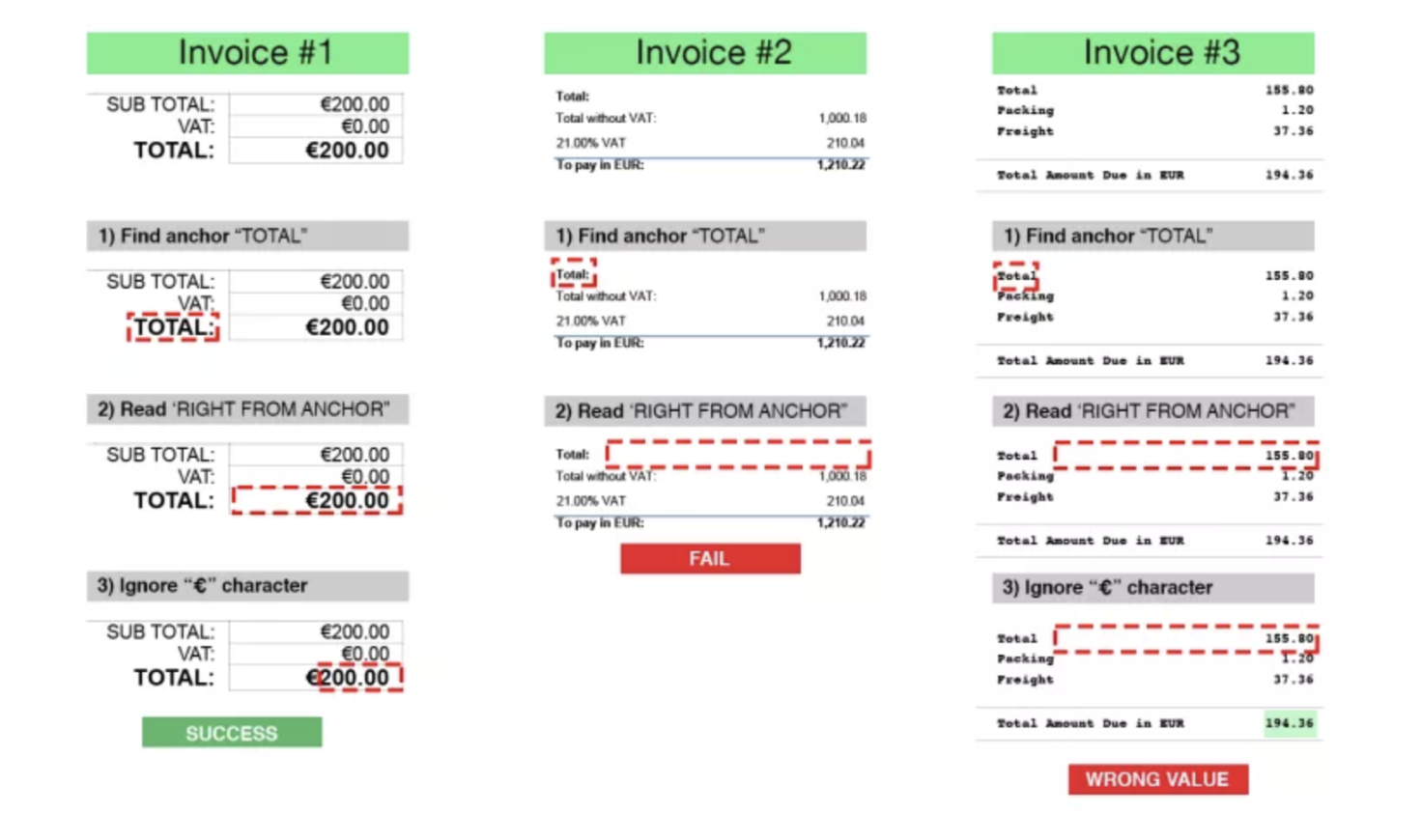
Illustration: Template-based OCR using hard-coded zones to extract "Total Amount." If the layout shifts even slightly, the extraction fails or mixes up fields. (Image source) rossum.ai
Other limitations of traditional OCRs
Traditional OCR systems struggle with real-world documents with complex layouts or imperfect image quality.
To demonstrate this, we tested Tesseract using a sample image from the FUNSD dataset via this huggingface space:
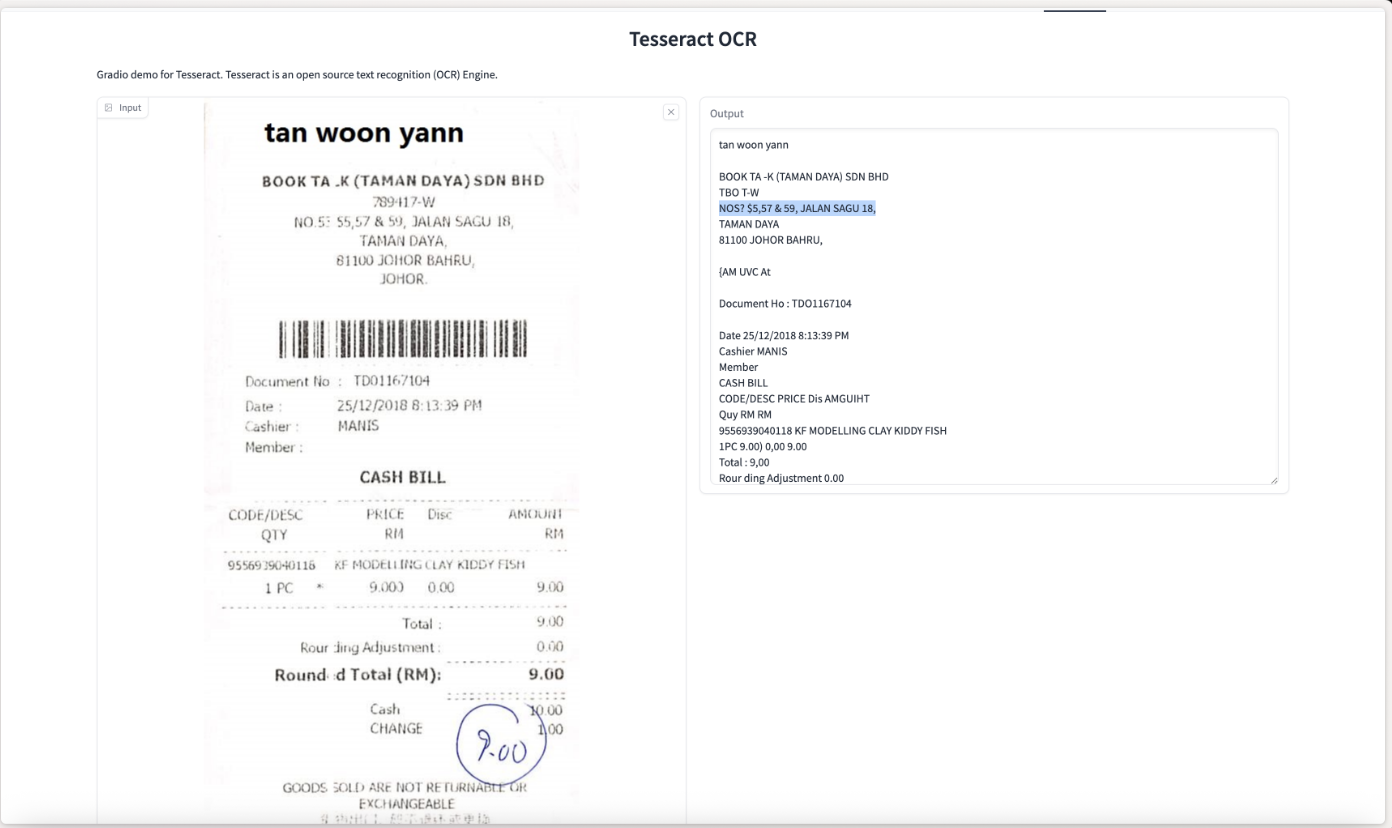
As shown in the output above, Tesseract made several recognition errors, misreading characters and struggling with the document's structure. This is a common limitation of traditional OCR engines.
To improve accuracy, extensive preprocessing is often required—deskewing, denoising, contrast enhancement, and binarization. While the Tesseract documentation provides guidance, this adds operational complexity and latency.
Era 2: AI OCR (Deep Learning–Based Extraction)
In the 2010s, deep learning transformed OCR.
Convolutional neural networks (CNNs) dramatically improved text detection and visual feature extraction, while sequence models such as RNNs and LSTMs improved recognition across languages and noisy inputs.
A key shift was contextual recognition.
Traditional OCR largely treats each character in isolation. Deep learning models, by contrast, understand how characters relate to one another within words and sentences, significantly improving accuracy for:
- Ambiguous characters
- Low-quality scans
- Handwritten text
PaddleOCR is a popular open-source OCR system built on this deep-learning architecture, so we’ll use it for comparison.
How AI OCR Improves on Traditional OCR
AI OCR systems are typically better at:
- Detecting text in skewed or noisy images
- Generalizing across fonts and layouts
- Handling multilingual content
Running the same FUNSD sample through PaddleOCR shows noticeably improved recognition:
Many character-level errors seen in Tesseract disappear.
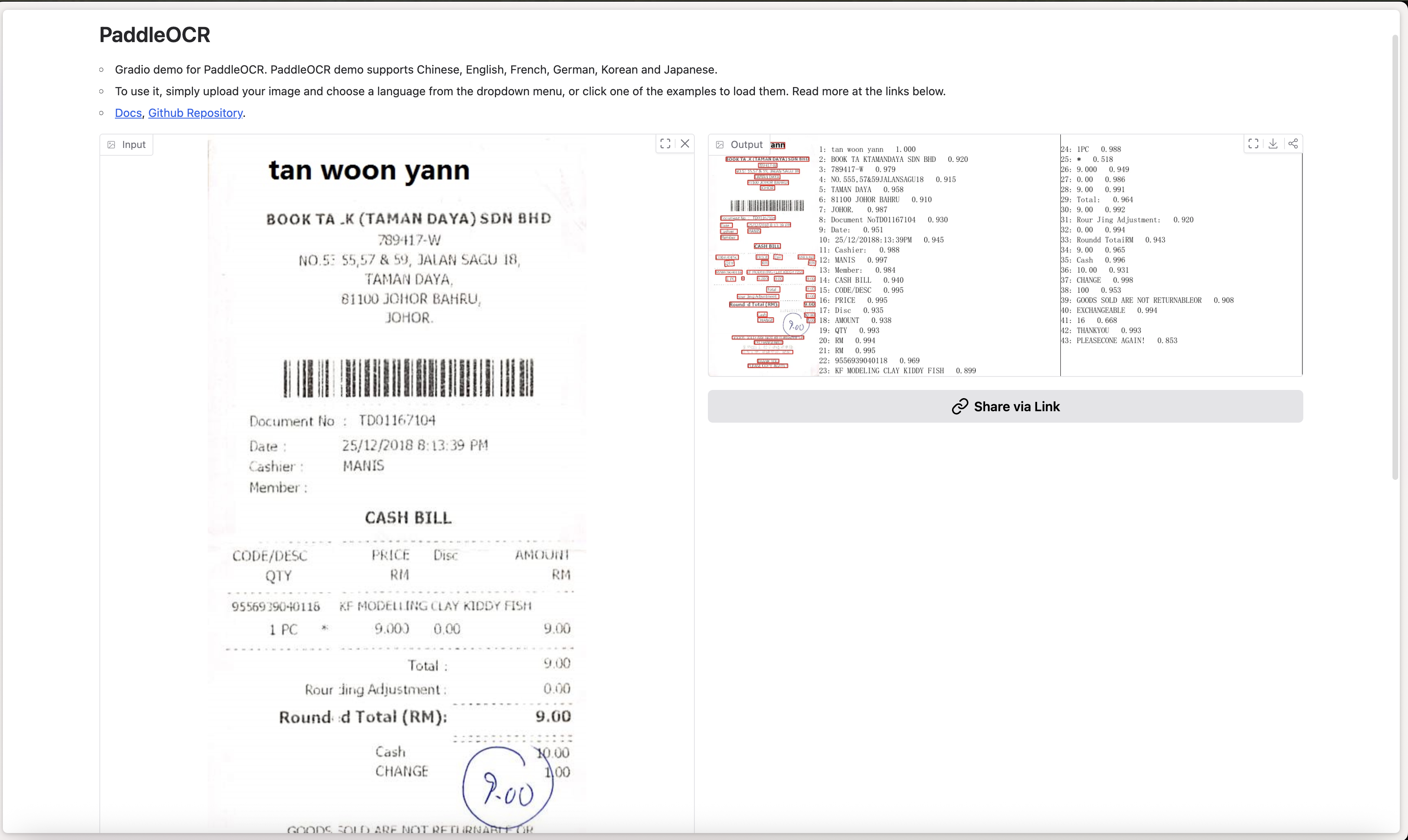
However, AI OCR still focuses primarily on recognition, not understanding the document as a whole. Tables are often flattened, and relationships between fields must still be reconstructed using downstream logic.
Customer Story
What took three people all day now takes ten minutes.
“We had almost three people tied up with filing paper, and we were still behind.

Era 3: GenAI OCR (Vision-Language Models)
Even with strong recognition, AI OCR struggles when structure matters.
Financial documents like bank statements and financial reports are rich in structure:
- Tables
- Multi-column layouts
- Key-value relationships
- Charts and figures
This is where GenAI OCR represents a major shift.
Instead of just reading text, GenAI OCR systems enables deep structural understanding layout, hierarchy, and semantic relationships.
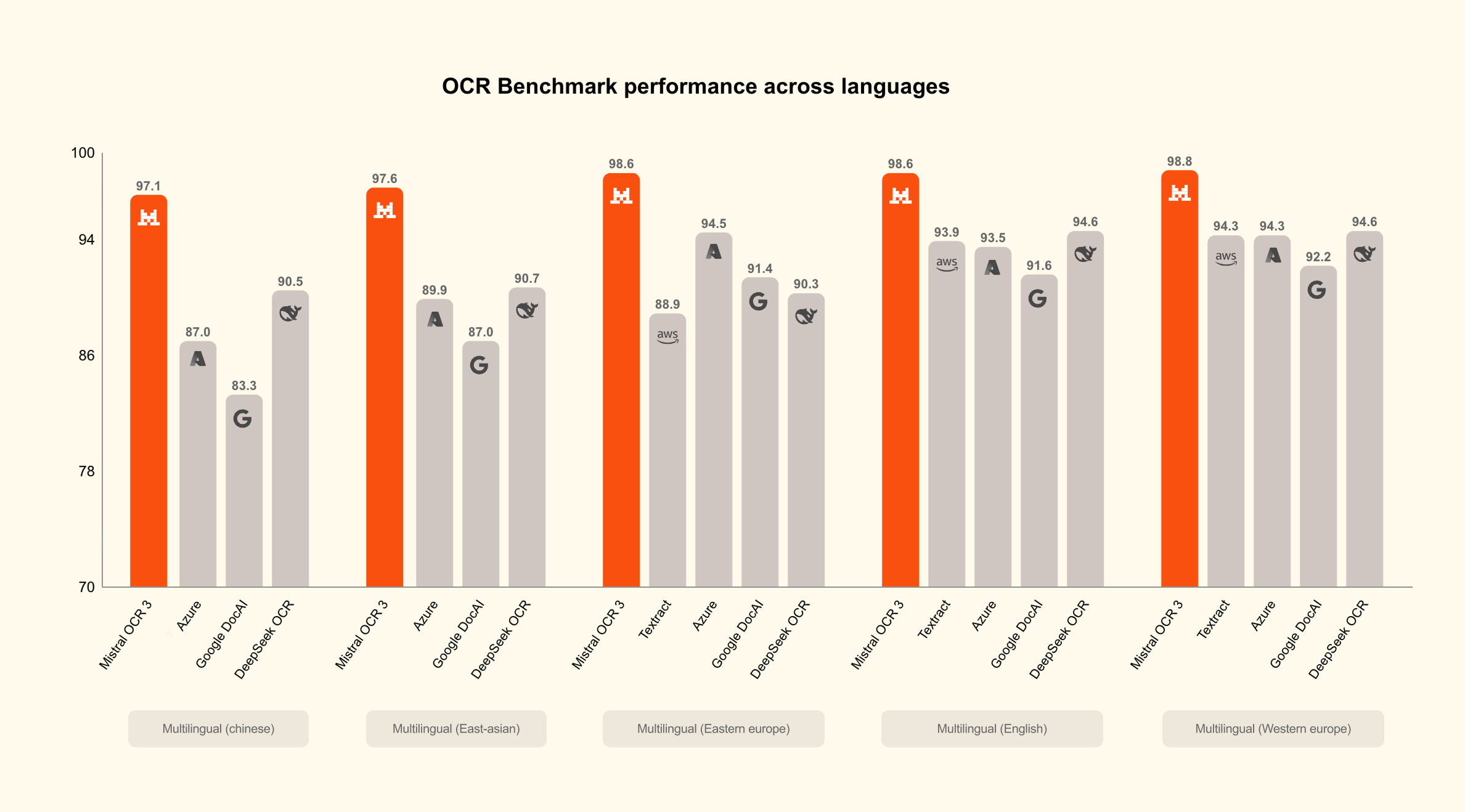
Current state-of-the-art document parsers are GenAI-based. For example, Mistral released Mistral OCR 3, which has achieved impressive results.
What Makes GenAI OCR Different?
GenAI OCR systems use Vision-Language Models (VLMs) that can process images and text together. Because they’re powerful general-purpose models, they tend to work well across document types and handle real-world messiness (noise, skew, mixed layouts, and imperfect scans) more robustly.
VLMs are trained on massive datasets which gives it general understanding between diverse visual inputs and their semantic textual content.
This gives it capability to recognize heterogeneous document elements, such as:
- Text blocks
- Tables (with structure)
- Mathematical formulas
- Charts and figures
While previous-generation OCR often outputs text + bounding boxes, VLM-based OCR can output structured representations (Markdown / JSON) that preserve layout and hierarchy.
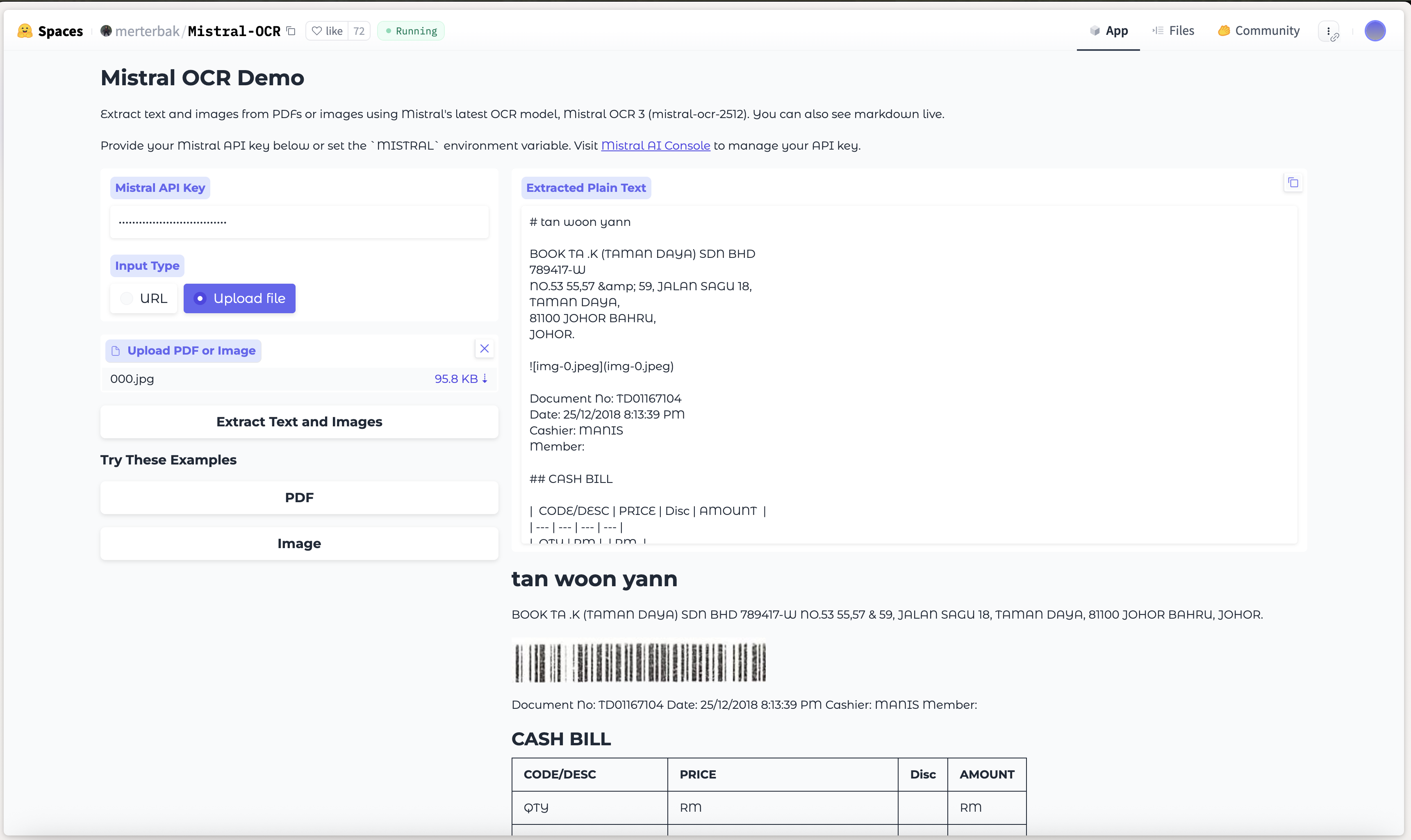
In the example above, Mistral OCR classifies the table and preserves its hierarchical structure instead of flattening it into a text blob.
How does GenAI OCRs work?
To undertand how moder GenAI-based OCR systems operate, let's look at Paddle OCR VLM. Most GenAI based OCRs follow similar architecture
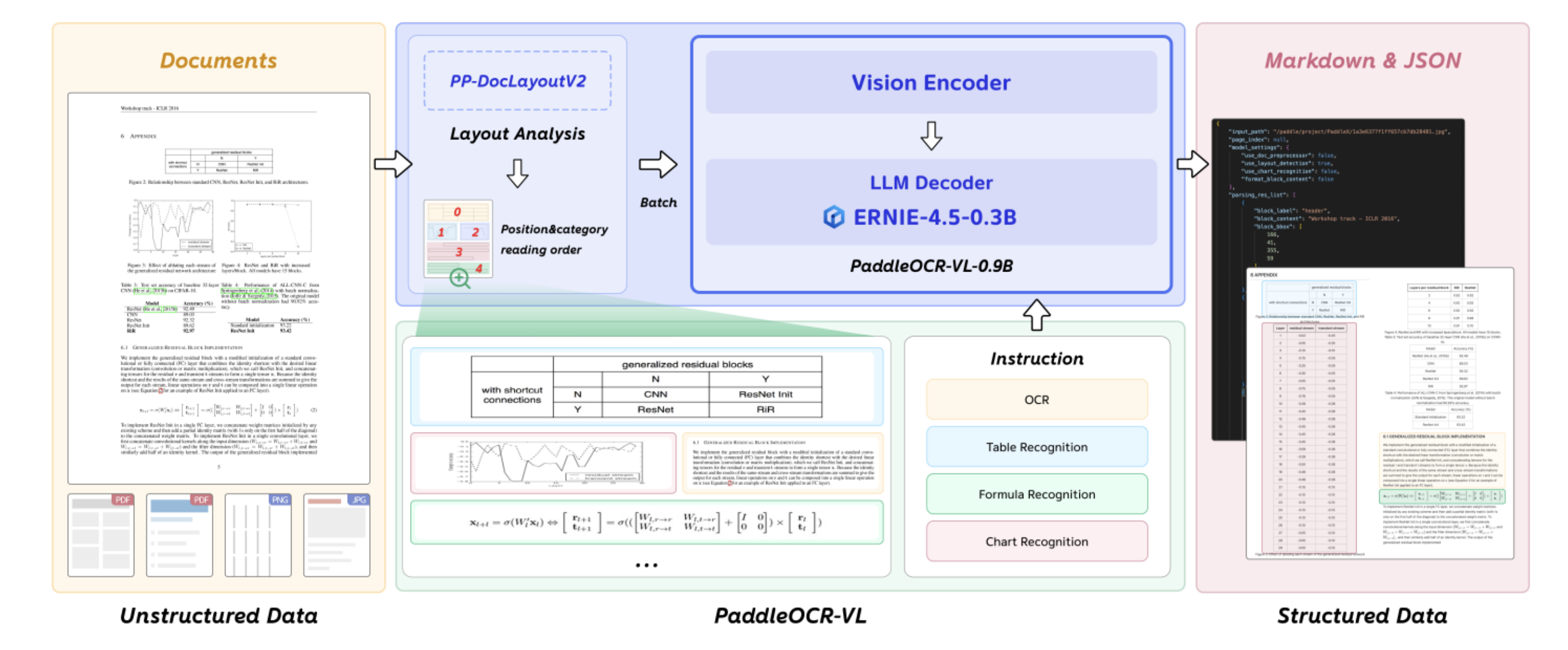
The first stage focuses on layout detection and reading order reconstruction which detects and classify elements in the document into text block, table, formula, chart etc. PaddleOCR-VLM uses a visual detection model based on (RT-DETR) to segment the page.
Each detected segment is then passed through a Transformer-based vision encoder (≈400M parameters). This encoder converts visual features—fonts, spatial relationships, symbols, and graphical cues—into rich embeddings.
These embeddings are subsequently fed into a large language model (LLM) decoder (≈300M parameters).
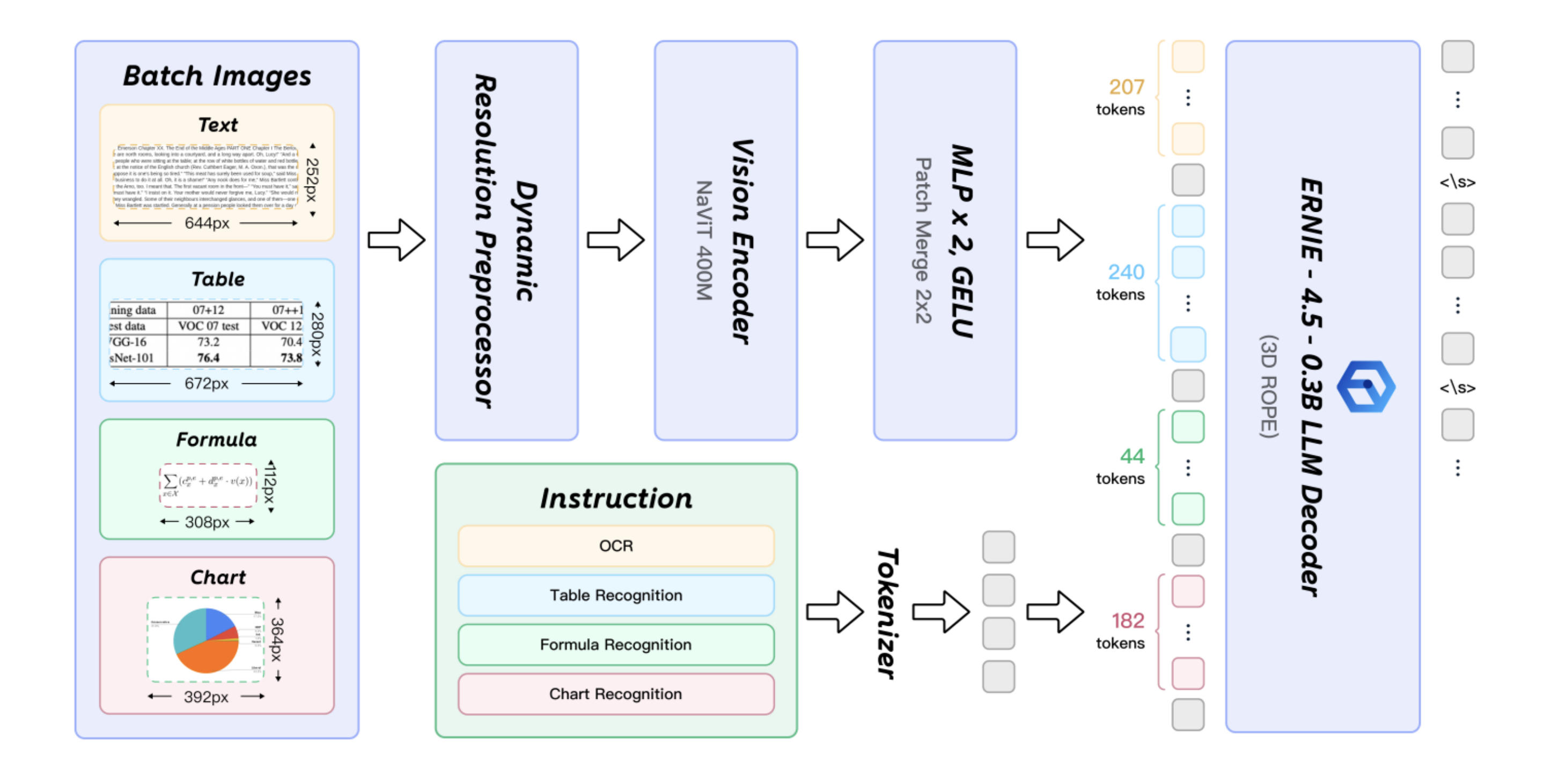
Note: All architecture diagrams are from https://arxiv.org/pdf/2510.14528.
This coupling between vision and language enables the model to reason about document content rather than simply transcribe text.
Limitations of GenAI OCR: Hallucinations
GenAI OCR introduces a new class of risk: hallucinations.
In financial workflows, even a single incorrect value can propagate into ledgers, reports, or compliance filings.
Examples include:
- Inferring a missing tax amount instead of flagging it
- Guessing a partially visible total.
Some reports have estimated global enterprise losses from AI hallucinations at over $67 billion across enterprise use cases. In finance, where accuracy and auditability are non-negotiable, this risk is especially critical.
To safely deploy GenAI OCR in production, teams typically rely on the following best practices:
- Grounding: extract only explicitly present values
- Provenance: return page-level evidence and coordinates
- Validation: enforce deterministic checks (totals, currencies, formats)
- Confidence thresholds: route uncertainty to human review
- Hybrid pipelines: use GenAI only when needed (e.g., complex pages) and fall back to cheaper OCR for the rest
With these safeguards, GenAI can accelerate workflows without silently introducing incorrect financial data.
Dealing with these challenges in your pipeline? We built VisionParser specifically to solve hallucination, accuracy, and integration problems in production document workflows. Tell us what you're building — we'll share what we've learned.
Which OCR Should You Use?
Should you always use a GenAI-based OCR? Not necessarily.
GenAI OCR trades higher cost and latency for greater flexibility and deeper document understanding. The right choice depends on your document mix, scale, and accuracy requirements.
GenAI OCR is a strong fit when you need:
- Reliable extraction from long-tail layouts where templates don’t exist or keep changing
- Table-heavy documents (bank statements, line items, financial reports)
- Direct structured output (JSON / Markdown) with fewer brittle heuristics
- Low-quality, real-world images
Classic deep-learning OCR is often enough when you have:
- High-volume, predictable document types with stable layouts
- Strict latency or cost constraints
- A well-defined post-processing layer you can control using rules and deterministic validation
In production, many teams combine both approaches. A common pattern is to run a fast, lower-cost OCR first, then selectively fall back to GenAI OCR only for low-confidence fields, complex tables, or structurally ambiguous pages.
This hybrid strategy delivers most of the flexibility of GenAI—without paying its cost on every page.
Conclusion
Now that you’ve understand how powerful GenAI based OCRs are if proper guardrails and best practices are implemented to avoid hallucination risks.
This is exactly the problem we built VisionParser to solve.
VisionParser combines state-of-the-art GenAI OCR with built-in hallucination safeguards, human-in-the-loop review, and secure deployments — purpose-built for financial document workflows. Tell us about your requirements and receive a complimentary assessment with personalized recommendations built specifically for your use case.
Request Free Assessment